

General Questions
Yes, SkillsFuture Singapore (SSG) and Workforce Singapore (WSG) will be merging into a new statutory board jointly overseen by the Ministry of Manpower (MOM) and the Ministry of Education (MOE).
This was announced on 12 February 2026, by Prime Minister and Minister of Finance, Mr Lawrence Wong at Budget 2026.
Through the merger, it will strengthen the integration of Singapore’s jobs-skills ecosystem. The new agency will be able to better align future skills with future job needs, delivering more seamless end-to-end career and employment services for Singaporean workers.
By overseeing careers and skills, the new agency will also be able to respond faster and more effectively to changes in the fast-evolving economy and labour market.
There is no service disruption during this transition. All existing contracts, initiatives, and programmes will continue to be in effect.
Scam Reporting
SWDA has registered “SWDA” and “SWDA" and e2i” with the Singapore SMS Sender ID Registry (SSIR). To ensure that the SMS you received is indeed from SWDA, please ensure that the sender is either “SWDA” or “SWDA and e2i”. Non-registered SMS will be labelled as “Likely-SCAM” (refer to example below).
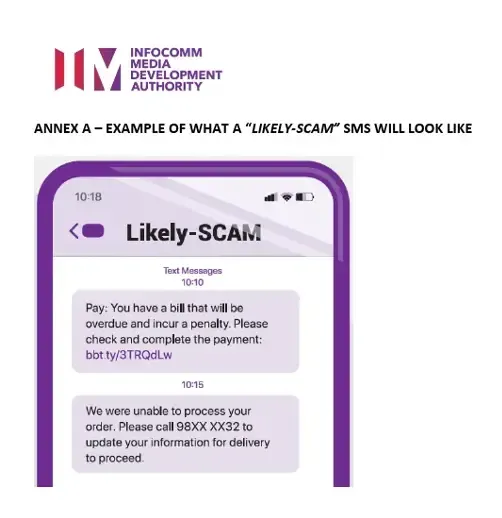
Nonetheless, please remain vigilant as scammers may use variations of a legitimate sender ID to attempt to trick unsuspecting recipients.
If you received an SMS supposedly from SWDA with the header “Likely-SCAM”, it would have been sent by a non-registered SMS account and you are advised to ignore it. Do not click on any links or log into websites via such links. If unsure, do contact us via our hotline (6669 7932) or Service Portal with a screenshot of the SMS for further assistance during our call centre operating hours (Mondays to Fridays 8.30am to 5.30pm, Saturday 8.30pm to 1.30pm). For incidents after operating hours, please file a police report via:
- Police hotline at 1800 255 0000
- Online Police Report
- Any nearest Neighbourhood Police Centre or Post
If you notice any calls or emails that you suspect to be scams, or websites that you suspect to be fake versions of the official SWDA, MyCareersFuture and MySkillsFuture websites, please reach out to SWDA via our hotline (6669 7932) or Service Portal with a screenshot of the SMS or email for further assistance during our call centre operating hours (Mondays to Fridays 8.30am to 5.30pm, Saturday 8.30pm to 1.30pm). For incidents after operating hours, please file a police report via:
- Police hotline at 1800 255 0000
- Online Police Report
- Any nearest Neighbourhood Police Centre or Post
In the unfortunate event you fall prey to a scam and have incurred monetary loss, loss of personal information, or discovered that your online account has been hacked or compromised, file a police report immediately:
- Police hotline at 1800 255 0000
- Online Police Report
- Any nearest Neighbourhood Police Centre or Post
For online scams
If a scammer had told you to access a website to key in your banking details or do online trading (phishing and investment scams), or asked you to download a mobile application from a website, you can report the link by keying in the full URL of the scam website visited, which may be from shortened URLs, (e.g. Tinyurl, Bit.ly). Refer to your Internet browser history to retrieve the full link. This allows for the authorities to take action against the website.
If a scammer had told you to access a website to key in your banking details or do online trading (phishing and investment scams), or asked you to download a mobile application from a website, you can report the link by keying in the full URL of the scam website visited, which may be from shortened URLs, (e.g. Tinyurl, Bit.ly). Refer to your Internet browser history to retrieve the full link. This allows for the authorities to take action against the website.
For phone scam
If you have fallen prey to a scam, you can report the phone number used by the scammer by entering the entire string of numbers with no spacing in between numbers (omit dashes) in your police report. Please indicate if the number has a ‘+’ prefix. For example: +65123456789
Do state the type of call made, e.g. normal call, WhatsApp, Telegram, IMO, Viber, etc.
If you have fallen prey to a scam, you can report the phone number used by the scammer by entering the entire string of numbers with no spacing in between numbers (omit dashes) in your police report. Please indicate if the number has a ‘+’ prefix. For example: +65123456789
Do state the type of call made, e.g. normal call, WhatsApp, Telegram, IMO, Viber, etc.
Please stay vigilant and beware of scam or phishing attempts. Here are some tips on how to protect yourself against phishing scams pretending to come from SWDA:
- Do not share your Singpass ID / password or banking details with anyone. SWDA officers will NOT ask for your Singpass or iBanking userids and passwords.
- Stay vigilant and only click on links from trusted sources. Always log in to your account from the official SWDA websites. To determine if a link will lead you to a malicious website or is reliable, you can hover your mouse over the link to view the full address. For mobile devices, you can hold your finger down on the link so that a window pops out and shows you the full address of the link.
- Verify the sender:
- For email, ensure that the sender’s email address is correctly spelt and ends with @swda.gov.sg.
- For SMS, ensure that the sender is either from “SWDA” or “SWDA and e2i”. We will not send SMS from other IDs.
- Telephone calls from SWDA officers to you will not begin with a prefix "+65". If a call has a prefix with a plus (+) sign, it is likely to be an overseas call. - Messages from SWDA may contain links to the SWDA website or other Government websites. Please check that the domain of such links end with “.gov.sg” before clicking on them.
- Do report any suspicious call or digital notifications spoofing SWDA via our hotline (6669 7932) or Service Portal during our call centre operating hours (Mondays to Fridays 8.30am to 5.30pm, Saturday 8.30pm to 1.30pm). For incidents after operating hours, please file a police report via:
- Police hotline at 1800 255 0000
- Online Police Report
- Any nearest Neighbourhood Police Centre or Post